
HR Software Delhi

#1 Timesheet Management Software in Delhi NCR

Precision Time Tracking for
Project Billing & Overtime.

Time is easy to track. Getting it right across projects, billing, and payroll is where most teams struggle. That’s where a connected system makes the biggest difference.
No credit card required
Quick Set-up
Delhi-based support
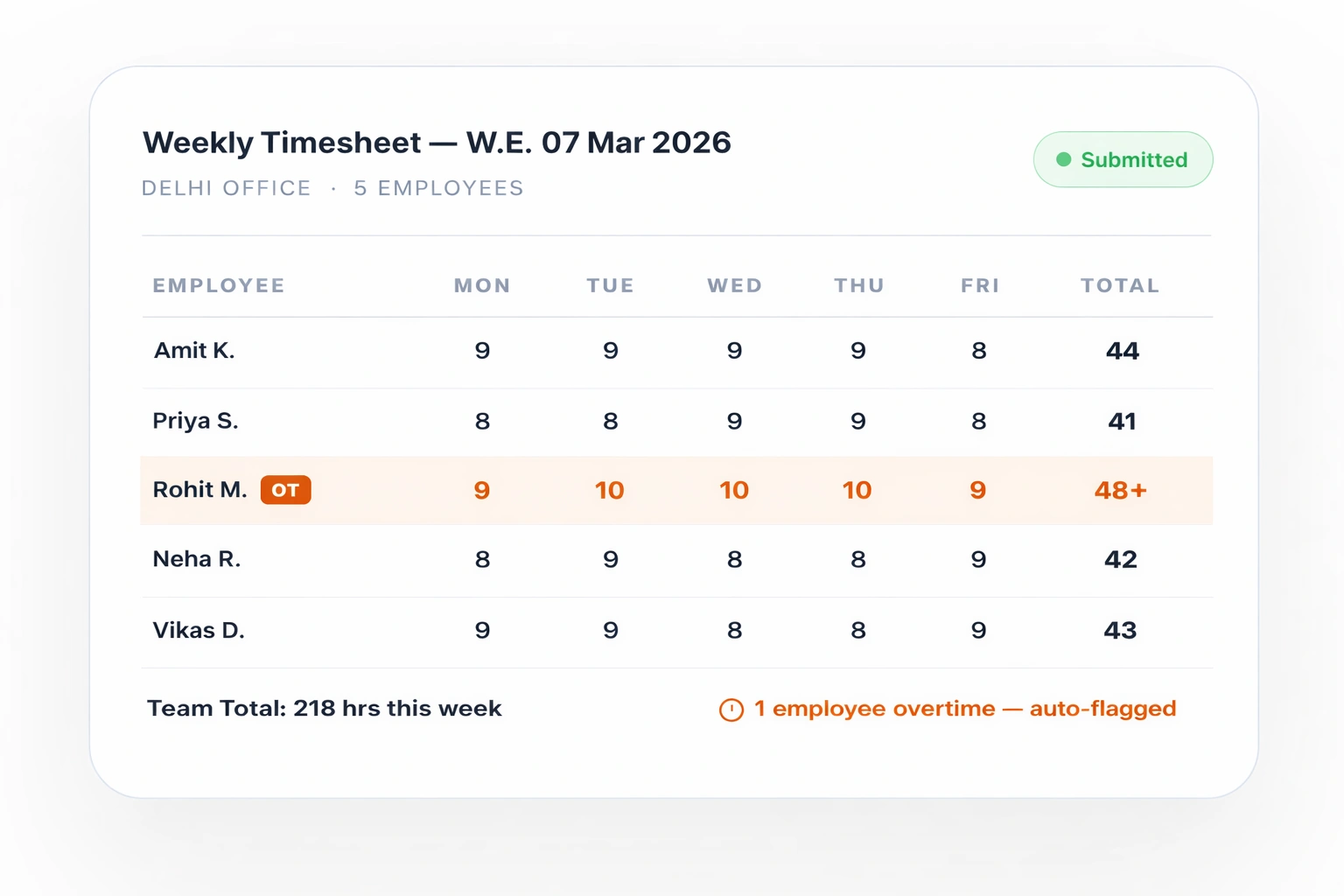
Approved by Manager
OT Flagged — Payroll Updated
timesheet management software in delhi ncr
Trusted by 500+ Delhi NCR businesses
UrbanLedger
AsterRetail
SkillPeak Tech
MetroServe
FastLogix
TechScale
DelhiBuilds
NCR Ventures
CapitalHR
SwiftOps
Pragatech
NexaForce
UrbanLedger
AsterRetail
SkillPeak Tech
MetroServe
FastLogix
TechScale
DelhiBuilds
NCR Ventures
CapitalHR
SwiftOps
Pragatech
NexaForce
How It Works

Logging time is just the beginning.

We automate three points in the workweek when time tracking, approvals, and payroll usually slow things down.

Morning · Daily Log
Employee Logs Hours from the App
Employees log time against projects or tasks using the mobile app or web. Entries stay linked to the right work without relying on spreadsheets or manual tracking.
Quick to Log
End of Week · Approval
Manager Reviews and Approves
Managers review submitted timesheets in the system. They can approve entries or flag them for correction with full visibility into hours and project breakdowns.
Clear Approval Flow
Payroll Date · Auto-Sync
Payroll Uses Approved Hours
Approved timesheet data is available for payroll processing. Regular hours, overtime, and project-based inputs stay aligned without re-entering data.
No Data Duplication
Works Across Teams and Roles
Employees can log time through mobile or web, whether they work in the office, on-site, or in the field.
Overtime and Extra Hours Visible
Track additional hours within timesheets so managers can review and account for them during approvals and payroll processing.
Audit-Ready Reports Always Available
Access timesheet data by employee, project, or period to support billing, internal tracking, and audits.
The Timesheet Problem

Stop Tracking Hours the Old Way.

Delhi NCR companies lose thousands every month to timesheet errors, manual overtime calculations and payroll disputes. This is how that changes.

The Old Way

Timesheets come in over Excel, email, and WhatsApp. Nothing in one place.
Half the team submits on time. The rest need chasing. Every week.
HR manually checks hours. Totals don't always match.
Overtime is unclear. Managers verify it on calls and messages.
Approvals happen in emails or chats. No clear record later.
The same data gets entered again for payroll. Errors creep in.
Payroll day turns into correction day. Employees question their payslips.
When audit or billing data is needed, it takes hours to compile.
OUR TIMESHEET

Automated Hours

Employees log hours from mobile or web. Entries stay in one system.
Timesheets are visible as they are filled. Less follow-up needed.
Total hours are calculated within the system. One source of truth.
Overtime is tracked along with logged hours for manager review.
Managers review and approve timesheets from their dashboard.
Approved hours are available for payroll processing without rework.
Payroll works with consistent data. Fewer last-minute corrections.
Reports are ready when needed. No digging through files or emails.
Everything Built In

Six Modules. One Timesheet System.

Every tool your HR team needs to track time accurately, approve without chasing and connect hours directly to payroll.

Saves 3 hrs/week
Daily & Weekly Timesheet Entry
Logging time isn't the hard part. Keeping it consistent across projects, teams, and formats usually is. This brings everything into one structured flow.
  • Daily or weekly time entry
  • Project and task-level tracking
  • Mobile and web access
  • Centralised time data
Saves 2 hrs/week
Manager Approval Workflow
Approval shouldn't depend on who replied on WhatsApp. This gives managers one place to review, respond, and move things forward.
  • Auto-routed approvals to managers
  • Single or bulk approval options
  • Rejection with comments
  • Complete approval history
Zero OT disputes
Overtime Detection & Alerts
The real problem starts after approvals. Moving clean time data into payroll without breaking it is where most teams struggle.
  • Approved hours flow into payroll
  • No duplicate data entry
  • Standardised data across systems
  • Ready-to-use reports
For IT & consulting
Project & Billing Visibility
Time connects to projects, clients, and actual work so you can see where effort goes and how it impacts billing or cost.
  • Project-wise time tracking
  • Client and task-level breakdown
  • Billable vs non-billable visibility
  • Reports for project costing and billing
Zero manual entry
One System Across HR & Payroll
Time connects to projects, clients, and actual work so you can see where effort goes and how it impacts billing or cost.
  • Integrated with payroll and HR modules
  • Shared data across attendance, leave, and timesheets
  • No scattered records across tools
  • Consistent data across processes
For field teams
Mobile-First for Real Teams
Time entry stays consistent across office, remote, and on-ground teams without changing tools or processes.
  • Mobile ESS for time entry
  • Web access for managers and HR
  • Simple interface for quick updates
  • One system across all employee types
India Labour Law Compliance Built In

Overtime Compliance Without Last-Minute Surprises

Delhi NCR businesses operate under two separate laws. Our system knows both and flags violations before they become payroll disputes or labour inspections.

Factories Act, 1948

Defines working hour limits and overtime rules for industrial units. These rules set the baseline for how working time and overtime are calculated.

Delhi Shops & Establishments Act

Applies to offices, retail, and service businesses across Delhi NCR, covering working hours, rest days, and overtime conditions.
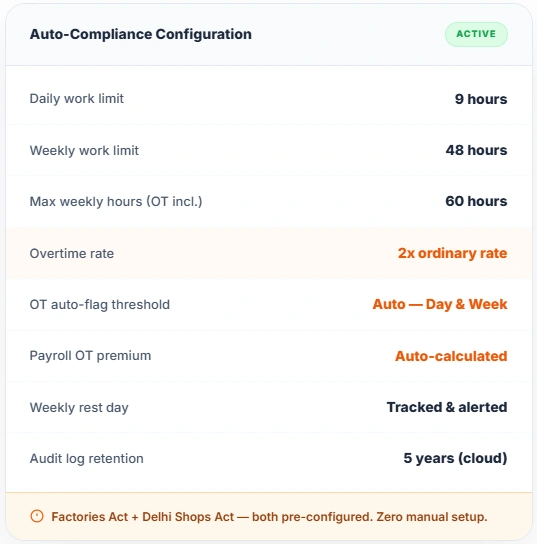
Our system is pre-configured for both Acts. Time, approvals, and reports are recorded in a single system, making it easier to review working hours and align with internal policies or statutory requirements.
auto compliance configuration
One Connected System

Biometric to Payslip. Zero Manual Steps.

Attendance, timesheets, leave, and payroll stay connected, so data flows across modules without constant rework.

Biometric / App
Punch-in · GPS · Manual
Timesheet
Hours logged + approved
Attendance
Present · Late · Absent
Leave
Days off deducted auto
Payroll
Salary calculated + paid

Data stays in one system and is reused across processes, reducing manual handling and improving consistency.

See It Live — Book a Demo
Built for Delhi NCR

Why Delhi NCR Teams
Choose This System

Timesheet tools built for Western markets assume predictable work patterns. Delhi NCR teams don’t work that way. You’re managing factory shifts in Okhla, project teams in Noida, retail staff across CP, and field teams in Gurugram. This system is designed to handle that mix without breaking your workflow.

Book a Demo
100%
Centralized hours, approvals, and reports
0
Duplicate Time Entries
500+
Businesses across Delhi, Noida & Gurugram are using it
4.9★
Average rating from HR managers in Delhi NCR
Multi-Shift Factory Timesheets
Factories running multiple shifts need more than daily totals. This handles shift-based entries, shift changes, and aligns time records with actual working hours on the floor, so approvals and payroll are based on what actually happened.
Project-Based Time Tracking
When billing depends on time, totals are not enough. Employees log hours against projects and tasks, giving managers clear visibility into effort spent and reports that can be used for billing or internal costing.
Store-Level Time Control
Teams working across multiple locations need separation without losing visibility. Each unit or store manages its own timesheets and approvals, while central HR still has a complete view across teams.
Works Across Work Setups
Office, field, and remote teams do not follow the same routine. This keeps time entry and approvals consistent across setups, so processes stay aligned even when teams work differently.
What HR Teams Say

Trusted by HR Leaders Across Delhi NCR

Real feedback from businesses using the platform.

★★★★★
We have a 220-person factory in Okhla on two shifts. Before, my team spent every Monday morning adding up Saturday timesheets by hand. Overtime disputes were a monthly headache. Since we switched, overtime is auto-calculated every single day. We have not had a single dispute in eight months.
RB
Rajesh Bhatia
HR Manager — Manufacturing Unit, Okhla Industrial Area Delhi
★★★★★
We are an IT consulting firm in Noida Sec 62 and we bill clients by the hour. Before this system, our consultants emailed weekly timesheets in Excel and I manually totalled hours per client. The project billing module changed everything. Hours are now per client, per project, per person — and my invoice reports take three minutes instead of three hours.
AV
Anita Verma
Operations Head — IT Consulting Firm, Noida Sector 62
★★★★★
We have 14 stores across Delhi with different shift timings per store. Previously each store manager WhatsApped me a photo of their attendance register. Now every store manager approves their team timesheets digitally on Friday. I see all 14 stores on one screen. What used to take a full day of consolidation now takes me 20 minutes.
PM
Pooja Malhotra
HR Lead — Retail Chain, 14 stores across Delhi NCR
Questions We Hear From Delhi NCR HR Teams

Frequently Asked Questions

What is timesheet management software and do I need it?
Timesheet management software lets employees log daily work hours digitally. Managers approve with one click and approved hours flow directly to payroll. If your team still emails Excel sheets or fills paper timesheets, you are losing hours to manual errors and payroll disputes every month. Most Delhi NCR businesses recover those losses within the first pay cycle.
Does it automatically calculate overtime as per Indian labour law?
Yes. The system is pre-configured for both the Factories Act (9 hours per day, 48 hours per week, double pay for overtime) and the Delhi Shops and Establishments Act. When an employee crosses the threshold, overtime is flagged automatically and the correct rate is applied to payroll — no manual calculation required.
How does timesheet data connect to payroll?
Once a manager approves a timesheet, the approved hours push directly to the payroll module. Regular hours, overtime, late arrivals and early exits are all factored in automatically. There is zero manual entry of hours into payroll — the system does it end to end. The salary is ready to process without any additional HR input.
Can employees fill timesheets from their phone?
Yes. Employees log daily hours, select the project or task, and submit from the mobile app. Field teams, remote workers and factory floor staff all use the same app. GPS-tagged entries are available for field teams. The app works on any Android or iOS device and has an offline mode that syncs when connectivity returns.
Does it work with biometric attendance devices?
Yes. Punch-in and punch-out data from biometric devices automatically populates the daily timesheet. Employees only need to add project or task details to complete the entry. All major biometric brands commonly used in Delhi NCR offices and factories are supported.
How quickly can we go live?
Go-live depends on how clearly your timesheet structure is defined and how quickly inputs are shared. Our team sets up shifts, projects, approvals, and payroll linkage. Once you review and approve the setup, your team can start logging time.
Start Today

Every Hour Your Team Works
Should Pay Them Correctly.

Book a 30-minute demo with our Delhi team. We will configure your shifts, set up your overtime rules and show you how timesheets sync to payroll — live, on your own employee data.

No credit card required
Quick Set-up
Delhi-based support team
All 9 Modules

One Platform. Every HR Function.

Payroll
Auto PF, ESI, TDS & Delhi min wages
Attendance
Biometric, geo-fence & selfie punch
Leave
Auto LOP, holiday sync & approvals
Performance
KRA, 360 reviews & appraisal cycles
Recruitment
ATS, job posting & interview scheduling
Onboarding
Digital offer letters & document collection
Expense
Receipt scan, limits & reimbursements
Employee Portal
Payslips, leave & requests on mobile