
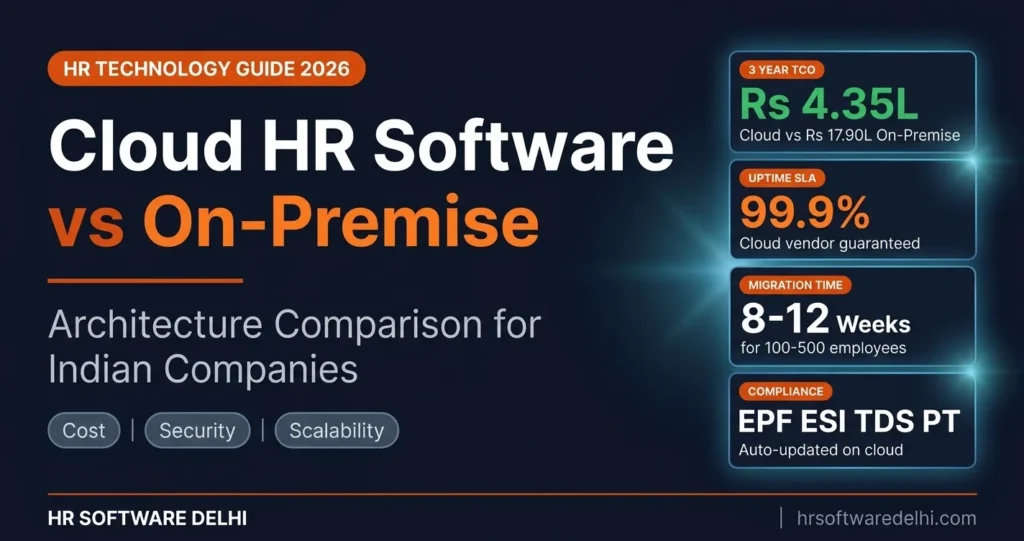
Cloud HR software vs on-premise is not just a technology choice. It is a cost and risk decision. Many Indian companies waste lakhs because they compare features and screenshots but ignore total cost of ownership, compliance automation, and data residency requirements. A business in Delhi, Noida, or Gurugram can pick the wrong deployment model and then spend three years paying for manual updates, IT support, downtime, and payroll correction work that a better HR software comparison would have prevented.
- Comparison table breaking down cloud vs on-premise across 10 parameters including deployment, cost, security, scalability, and compliance updates.
- 3 year TCO calculation with real INR numbers for a 100 employee company in Delhi showing cloud at Rs 4.35 lakh vs on-premise at Rs 17.90 lakh.
- Data security and DPDP Act 2023 compliance breakdown for both deployment models with a feature comparison table.
- Compliance automation differences for EPF, ESI, TDS, and professional tax filing between cloud and on-premise systems.
- Decision criteria to help you choose cloud, on-premise, or hybrid based on company size, IT capability, and growth plans.
- Migration roadmap with 5 steps and an 8 to 12 week timeline to move from on-premise to cloud.
What Is Cloud HR Software?
Cloud HR software is a SaaS based HRMS hosted on remote servers and accessed through a web browser or mobile app. The software provider manages the infrastructure, uptime, backups, updates, and core security layers. Instead of buying and maintaining your own server, the company uses a subscription model and logs in over the internet.
For Indian businesses, this means no server purchase, no internal hosting setup, and no need for a full IT team just to keep HR running. Most companies pay monthly per employee, start faster, and access the system from any location. This matters for businesses spread across Delhi NCR, especially when HR teams manage attendance, leave, payroll inputs, and compliance from Delhi, Noida, and Gurugram together. Most modern platforms now run on cloud because auto updates and compliance automation reduce manual work for EPF filing, ESI, TDS, and payslip processing.
What Is On-Premise HR Software?
On-premise HR software is installed on servers owned or controlled by the company. The business usually pays a one time license fee, sets up server hosting internally, and takes responsibility for infrastructure, storage, network access, backups, and software maintenance.
In practical terms, on-premise HR software gives the organization more direct control over where data sits and how the system is configured. But it also needs dedicated IT support, manual updates, hardware planning, and a higher upfront budget. Many legacy Indian companies, factories, and some government contractors still prefer on-premise because they want data kept inside their own network or need deep customization that standard SaaS HR products may not offer. If you are still evaluating the fundamental differences between HRIS, HRMS, and HCM categories, that context helps frame which deployment model fits each platform type.
Cloud vs On-Premise HR Software: Key Differences
Any serious hr software comparison should go beyond features and look at operating model, security responsibility, and long term cost. The table below shows the core difference in cloud hr software vs on-premise for Indian businesses.
| Parameter | Cloud HR Software | On-Premise HR Software |
|---|---|---|
| Deployment | Accessed through browser or app | Installed on company server or local network |
| Upfront Cost | Low setup fee | High hardware and license cost |
| Recurring Cost | Monthly or annual subscription | Maintenance, AMC, server upkeep, IT support |
| Data Location | Vendor managed cloud, often selectable by region | Company owned server or data center |
| Updates | Automatic | Manual patches and version upgrades |
| Customization | Configuration based, moderate | Code level customization possible |
| Scalability | Instant, add users or modules quickly | Depends on hardware capacity and license expansion |
| Security | Vendor managed, ISO 27001 and SOC 2 controls | Company managed, depends on internal IT maturity |
| Compliance Updates | Auto pushed by vendor | Manual patching and testing required |
| Mobile and Remote Access | Built in natively | VPN or special remote setup required |
Total Cost of Ownership: 3 Year Comparison
This is where the cloud vs on-premise debate becomes real. A 100 employee company in Delhi may think on-premise is cheaper because it avoids subscription bills. But over three years, license, hardware, IT time, maintenance, and patching usually make on-premise HR software much more expensive.
| Cost Component | Cloud (3 Year Total) | On-Premise (3 Year Total) |
|---|---|---|
| Software License or Subscription | Rs 3,60,000 (100 employees x Rs 100/month x 36 months) | Rs 5,00,000 (one time license fee) |
| Implementation and Setup | Rs 75,000 | Included in deployment |
| Server Hardware | Rs 0 | Rs 3,00,000 |
| IT Staff Allocation | Rs 0 | Rs 5,40,000 (Rs 15,000/month x 36 months) |
| Annual Maintenance Contract | Included | Rs 3,00,000 (20% of license x 3 years) |
| Updates and Patches | Included | Rs 1,50,000 (Rs 50,000/year x 3 years) |
| Total | Rs 4,35,000 | Rs 17,90,000 |
The difference is Rs 13,55,000 over three years. That is why cloud hr software vs on-premise usually tilts strongly toward cloud for small and mid sized businesses. Companies that already run their payroll on cloud software confirm that the subscription model eliminates surprise costs from hardware failures, AMC escalations, and emergency IT support.
Data Security and Compliance
Cloud Security
Good cloud HR software is built for continuous access and centralized protection. Enterprise vendors typically use AES 256 encryption for data at rest and TLS 1.3 for data in transit, along with role based access controls, audit logs, automatic backups, and multi region disaster recovery. Many operate against globally recognized security frameworks such as ISO 27001 and SOC 2 Type II, while committing to 99.9% uptime SLAs. For Indian businesses, reputable providers now host data directly within Indian data centers in Mumbai or Chennai regions, which helps companies align with internal data residency preferences.
On-Premise Security
On-premise HR software gives full physical and network level control to the company. Data sits on your own server environment, so access policies, firewall configuration, storage, and backup cycles stay inside your organization. Businesses that are still evaluating what HR software should handle for them often overestimate how much internal security they can realistically maintain. That sounds safer in theory, but it only works if your IT team actually maintains strong patching, monitoring, redundancy, and recovery processes. Most small and mid sized businesses do not have mature disaster recovery planning, secondary backup locations, or regular security audits, which makes on-premise security weaker than expected.
DPDP Act 2023 Compliance
The Digital Personal Data Protection Act, 2023 applies to digital personal data processing in India. For HR software, that means employee data must be handled with lawful purpose, clear notices, appropriate security safeguards, and a workable process for grievance handling. In cloud hr software vs on-premise, both models can comply, but the operating burden differs. Cloud systems often make policy rollouts, consent notice changes, access control, and audit tracking easier to manage centrally. On-premise setups can comply too, but the company must manually keep documentation, access controls, retention logic, and process changes current. If the provider offers Indian hosting, cloud deployment also addresses common data residency concerns for Delhi NCR employers.
| Security Parameter | Cloud HR Software | On-Premise HR Software |
|---|---|---|
| Data Encryption | AES 256 and TLS 1.3 standard | Depends on internal IT setup |
| Global Certification | SOC 2 and ISO 27001 standard | Requires independent company audit |
| Data Backup | Automated and continuous | Manual or semi manual in most cases |
| Disaster Recovery | Multi region failover built in | Requires expensive secondary servers |
| Data Residency | Indian data centers available | Local physical office servers |
| DPDP Compliance | Automated privacy tools included | Manual tracking and policy updates |
Compliance Automation
Cloud HR Software
- Auto calculates EPF contribution at 12% based on current rules and configured wage structure.
- Processes ESI accurately at 0.75% for employees and 3.25% for employers where applicable.
- Calculates TDS dynamically per the latest central government tax slabs.
- Adjusts professional tax automatically based on state of employment.
- Generates ECR challans, Form 24Q, and annual Form 16 documents without manual intervention.
- Pushes updates for tax slabs and wage ceilings when government changes them, reducing manual follow up.
Companies that already understand what payroll involves in India know that statutory calculations change frequently. Cloud systems absorb those changes without requiring your HR team to track government notifications manually.
On-Premise HR Software
- Calculations often reflect the setup done at installation time.
- Compliance changes need manual patches, parameter changes, or vendor intervention.
- Tax updates or wage ceiling changes may take weeks to reflect if the system is not maintained actively.
- Internal teams must test every update before payroll is processed.
- Delayed changes increase the chance of wrong payroll calculation, late filing, or correction runs.
If your team still processes salaries manually or through spreadsheets, understanding how to process payroll step by step can help you evaluate what cloud automation actually replaces.
Scalability and Multi-Location Support
Cloud HR software scales much faster because infrastructure is already available. If your headcount grows from 100 to 250 employees, or if you add new branches in Delhi, Noida, Gurugram, or Faridabad, the system can expand with a plan upgrade and access configuration. New modules for attendance tracking, leave management, onboarding, expense tracking, or performance can be turned on without buying more hardware. This makes cloud a natural fit for multi-location companies and service businesses with distributed workforces.
On-premise HR software scales only when your servers, storage, licenses, and network setup are ready for the next level. Each new location may need extra remote access configuration, VPN dependency, and more support effort. For companies that rely on accurate attendance data across multiple offices, cloud makes consolidated reporting far simpler than managing separate on-premise instances at each site.
When to Choose Cloud HR Software
- Company size is between 10 and 500 employees.
- You operate across multiple office locations in Delhi NCR.
- You do not have a dedicated internal IT team.
- Your workforce requires mobile access, remote approvals, and self service portals.
- You want automatic compliance updates for EPF, ESI, TDS, and professional tax.
- You prefer predictable monthly cost over a large capital expense.
When to Choose On-Premise HR Software
- You have strict internal data sovereignty rules, such as defense linked work or government contracting requirements.
- You already have strong IT infrastructure and a capable in house team.
- You need deep customization beyond standard module configuration.
- You have one time budget approval and want to avoid subscription billing.
- Your primary operating location has unreliable internet connectivity.
Hybrid HR Software: The Third Option
Hybrid HR combines both models. A company may run core HR, employee self service, and attendance workflows on cloud, while keeping selected payroll data or custom reporting infrastructure on a local server. This model makes sense for large enterprises with compliance heavy divisions, internal control mandates, or gradual migration plans. It is gaining traction in Delhi NCR among organizations with 500 plus employees that want cloud convenience without moving every workload at once.
How to Migrate from On-Premise to Cloud
Migration does not need to be chaotic if it is planned properly. For most companies with 100 to 500 employees, the full shift from on-premise HR software to cloud HR software takes about 8 to 12 weeks.
- Audit current data and modules in use. List every active module, employee master field, payroll setting, leave policy, shift rule, approval workflow, and compliance report. Remove duplicate fields, obsolete salary components, and broken workflows before migration starts.
- Choose a cloud vendor with Indian data centers. Check hosting region, security posture, uptime commitment, backup process, and support model. For India focused businesses, ask specifically about data residency and support for Delhi, Haryana, and UP payroll conditions.
- Run parallel systems for 2 to 3 months. Do not shut the old system on day one. Run payroll, attendance, and leave balances in both systems together for at least two cycles to catch mismatch issues before final cutover.
- Migrate historical data. Move employee records, salary history, leave balances, attendance records, investment declarations, tax data, and payroll registers in a structured format. Validate sample records carefully before bulk import.
- Train the HR team and decommission old servers. Train HR, payroll, managers, and employees on approvals, reports, ESS access, and compliance tasks. A well structured onboarding workflow in the new cloud system ensures that even new hires joining during migration get a smooth experience.
Final Word
For most Indian businesses, especially those under 200 employees, cloud hr software vs on-premise is no longer a close contest. Cloud delivers lower total cost of ownership, faster rollout, easier compliance automation, better multi-location access, and less dependency on internal IT. On-premise still has a place where customization, internal hosting control, or contractual data restrictions are non negotiable.
For Delhi NCR companies trying to scale across Delhi, Noida, Gurugram, Haryana, and UP without building an expensive HR tech stack, the smarter question is not whether cloud is trendy. It is whether your current model is slowing down payroll, compliance, and decision making more than it should. Book a free demo to see how a cloud HRMS handles your exact requirements.
Frequently Asked Questions
What is the difference between cloud and on-premise HR software?
Cloud HR software runs on vendor managed servers and is accessed through the internet. On-premise HR software runs on infrastructure controlled by the company and usually needs internal server management. In cloud hr software vs on-premise, the biggest difference is who handles hosting, updates, backups, and security operations. Cloud reduces IT burden, while on-premise gives more internal control.
Is cloud HR software safe for Indian companies?
Yes, cloud HR software can be very safe when the provider uses strong encryption, access controls, backup routines, audit logs, and recognized security standards like ISO 27001 and SOC 2. For many businesses, a well managed cloud environment is safer than a lightly maintained internal server. The key is to review security controls, hosting region, uptime commitment, and support process before buying. Indian data hosting options also help address internal comfort around data residency.
How much does cloud HR software cost in India?
Pricing varies by module and vendor, but a common range is Rs 80 to Rs 150 per employee per month for a standard HRMS cloud setup. For a 100 employee company using Rs 100 per employee per month, the subscription cost over three years comes to Rs 3,60,000. Add one time implementation of about Rs 75,000, and the total becomes Rs 4,35,000. That is usually far lower than the full three year cost of on-premise HR software.
Can I switch from on-premise to cloud HR software?
Yes, and many companies are doing exactly that through phased migration. The safest approach is to audit current data, clean legacy configurations, and run both systems in parallel for two or three payroll cycles. Historical data such as employee records, leave balances, and payroll history can be migrated in batches. For a mid sized company, the full migration generally takes 8 to 12 weeks.
Which is better for small businesses: cloud or on-premise?
For most small businesses, cloud is better because it avoids server cost, reduces IT dependence, and offers predictable monthly pricing. It also makes payroll, leave, attendance, and compliance easier to manage without a large support team. On-premise usually makes sense only when there is a specific internal policy or technical reason to keep systems in house. That is why cloud vs on-premise decisions for small firms usually favor cloud.
Does cloud HR software work without internet?
No, cloud HR software needs internet access for normal use because the application runs on remote infrastructure. Some mobile apps may cache limited data briefly, but full HR and payroll processing still depends on connectivity. If your location has unstable internet all the time, on-premise may feel safer operationally. That said, most urban businesses in Delhi NCR can comfortably run cloud systems with standard broadband and backup connectivity.
What is DPDP Act compliance for HR software?
DPDP Act compliance means the HR software and the employer must handle employee personal data with lawful purpose, proper notice, security safeguards, and a process for grievance handling. It is not just a software feature, it is an operating responsibility. Cloud tools can make notice management, access logs, and centralized controls easier, but on-premise systems must meet the same legal standard. The real issue is whether your team can maintain those controls consistently.
Is on-premise HR software still relevant in 2026?
Yes, on-premise HR software is still relevant in 2026 for certain organizations. It remains useful where internal hosting is mandatory, customization is unusually heavy, or internet dependency is a business risk. But for most growing businesses, especially those evaluating cloud hr software vs on-premise on cost and agility, cloud is the more practical option. On-premise is now a specialized choice, not the default one.
